Android でアプリケーションが強制終了したとき、エラーレポートを送るようにする
フォトライフアプリは例外発生時にバグレポを送れるようになってます。
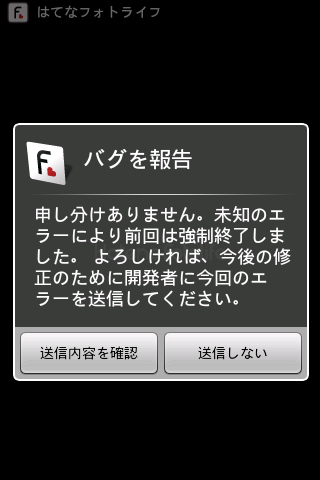
バグレポの仕組みは、http://www.adamrocker.com/blog/288/bug-report-system-for-android.html で述べられているようなやり方で、フォトライフアプリではサーバサイドなしにしたりとか簡略化して実装をしています。
開発中やらデバッグ中も、ケーブルレスでエラースタックトレースが見れるようになるのでとても便利です。
100行程度なので、めんどくさいのでコード貼っておくと
import java.io.BufferedReader;
import java.io.File;
import java.io.FileReader;
import java.io.PrintWriter;
import java.lang.Thread.UncaughtExceptionHandler;

import android.app.Activity;
import android.app.ActivityManager;
import android.app.AlertDialog;
import android.content.Context;
import android.content.DialogInterface;
import android.content.Intent;
import android.content.pm.PackageInfo;
import android.content.pm.PackageManager.NameNotFoundException;
import android.net.Uri;
import android.os.Build;

class ErrorReporter implements UncaughtExceptionHandler {
    private static Context sContext = null;
    private static PackageInfo sPackageInfo = null;
    private static ActivityManager.MemoryInfo sMemoryInfo = new ActivityManager.MemoryInfo();

    private static final String BUG_FILE = "BUG";
    private static final String MAIL_TO  = "mailto:cho45@lowreal.net";
    private static final UncaughtExceptionHandler sDefaultHandler = Thread.getDefaultUncaughtExceptionHandler();

    public static void setup(Context context) {
        context = context.getApplicationContext();

        try {
            sPackageInfo = context.getPackageManager().getPackageInfo(context.getPackageName(), 0);
        } catch (NameNotFoundException e) {
            e.printStackTrace();
        }

        sContext = context;

        Thread.setDefaultUncaughtExceptionHandler(new ErrorReporter());
    }

    public static void bugreport(final Activity activity) {
        File bugfile = activity.getFileStreamPath(BUG_FILE);
        if (!bugfile.exists()) return;

        File dstfile = activity.getFileStreamPath(BUG_FILE + ".txt");
        bugfile.renameTo(dstfile);

        final StringBuilder body = new StringBuilder();
        String firstLine = null;
        try {
            BufferedReader br = new BufferedReader(new FileReader(dstfile));
            String line;
            while ((line = br.readLine()) != null) {
                if (firstLine == null) {
                    firstLine = line;
                } else {
                    body.append(line).append("\n");
                }
            }
        } catch (Exception e) {
            e.printStackTrace();
        }

        final String subject = firstLine;
        new AlertDialog.Builder(activity)
            .setIcon(R.drawable.icon)
            .setTitle(R.string.bug_report)
            .setMessage(R.string.bug_report_message)
            .setPositiveButton(R.string.bug_report_positive_button, new DialogInterface.OnClickListener() {
                public void onClick(DialogInterface dialog, int which) {
                    activity.startActivity(
                        new Intent(Intent.ACTION_SENDTO, Uri.parse(MAIL_TO))
                            .putExtra(Intent.EXTRA_SUBJECT, subject)
                            .putExtra(Intent.EXTRA_TEXT, body.toString())
                    );
                }
            })
            .setNegativeButton(R.string.bug_report_negative_button, new DialogInterface.OnClickListener() {
                public void onClick(DialogInterface dialog, int which) {
                }
            })
            .show();
    }


    public void uncaughtException(Thread thread, Throwable error) {
        error.printStackTrace();

        try {
            PrintWriter writer = new PrintWriter(sContext.openFileOutput(BUG_FILE, Context.MODE_WORLD_READABLE));
            if (sPackageInfo != null) {
                writer.printf("[BUG][%s] versionName:%s, versionCode:%d\n", sPackageInfo.packageName, sPackageInfo.versionName, sPackageInfo.versionCode);
            } else {
                writer.printf("[BUG][Unkown]\n");
            }
            try {
                writer.printf("Runtime Memory: total: %dKB, free: %dKB, used: %dKB\n",
                    Runtime.getRuntime().totalMemory() / 1024,
                    Runtime.getRuntime().freeMemory() / 1024,
                    (Runtime.getRuntime().totalMemory() - Runtime.getRuntime().freeMemory()) / 1024
                );
            } catch (Exception e) {
                e.printStackTrace();
            }
            try {
                ((ActivityManager)sContext.getSystemService(Context.ACTIVITY_SERVICE)).getMemoryInfo(sMemoryInfo);
                writer.printf("availMem: %dKB, lowMemory: %b\n", sMemoryInfo.availMem / 1024, sMemoryInfo.lowMemory);
            } catch (Exception e) {
                e.printStackTrace();
            }
            writer.printf("DEVICE: %s\n", Build.DEVICE);
            writer.printf("MODEL: %s\n", Build.MODEL);
            writer.printf("VERSION.SDK: %s\n", Build.VERSION.SDK);
            writer.println("");
            error.printStackTrace(writer);
            writer.close();
        } catch (Exception e) {
            e.printStackTrace();
        }

        sDefaultHandler.uncaughtException(thread, error);
    }
}
てな感じで
- R.drawable.icon
- R.string.bug_report
- R.string.bug_report_message
- R.string.bug_report_positive_button
- R.string.bug_report_negative_button
あたりをリソースに使いつつ、各 Activity の onCreate で
ErrorReporter.setup(this);を早い段階で呼び、
if (mPref.getBoolean(Setting.SEND_BUG, true)) ErrorReporter.bugreport(FooActivity.this);を適当に、ダイアログを表示する準備ができたときに呼んでやっています。
ErrorReporter.bugreport は前回アプリケーションが強制終了した痕跡があるなら、ダイアログを表示してユーザにレポートの送信を求めます。やってることは単にメール Intent を投げてるだけなので、特にパーミッションもいりません。