✖

エミュレータを
emulator -dns-server 8.8.8.8 -avd android1.6
みたいに起動。プライベート IP を指定するとアクセスできなかったりするので Google DNS をつかうのが楽
さらに、自作のアプリケーションの場合、
<uses-permission android:name="android.permission.INTERNET" />が入っていることを確認する。
フォトライフアプリは例外発生時にバグレポを送れるようになってます。
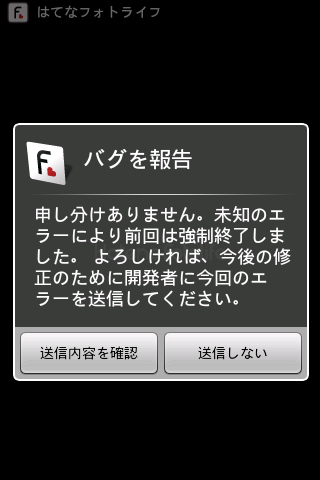
バグレポの仕組みは、http://www.adamrocker.com/blog/288/bug-report-system-for-android.html で述べられているようなやり方で、フォトライフアプリではサーバサイドなしにしたりとか簡略化して実装をしています。
開発中やらデバッグ中も、ケーブルレスでエラースタックトレースが見れるようになるのでとても便利です。
100行程度なので、めんどくさいのでコード貼っておくと
import java.io.BufferedReader;
import java.io.File;
import java.io.FileReader;
import java.io.PrintWriter;
import java.lang.Thread.UncaughtExceptionHandler;

import android.app.Activity;
import android.app.ActivityManager;
import android.app.AlertDialog;
import android.content.Context;
import android.content.DialogInterface;
import android.content.Intent;
import android.content.pm.PackageInfo;
import android.content.pm.PackageManager.NameNotFoundException;
import android.net.Uri;
import android.os.Build;

class ErrorReporter implements UncaughtExceptionHandler {
    private static Context sContext = null;
    private static PackageInfo sPackageInfo = null;
    private static ActivityManager.MemoryInfo sMemoryInfo = new ActivityManager.MemoryInfo();

    private static final String BUG_FILE = "BUG";
    private static final String MAIL_TO  = "mailto:cho45@lowreal.net";
    private static final UncaughtExceptionHandler sDefaultHandler = Thread.getDefaultUncaughtExceptionHandler();

    public static void setup(Context context) {
        context = context.getApplicationContext();

        try {
            sPackageInfo = context.getPackageManager().getPackageInfo(context.getPackageName(), 0);
        } catch (NameNotFoundException e) {
            e.printStackTrace();
        }

        sContext = context;

        Thread.setDefaultUncaughtExceptionHandler(new ErrorReporter());
    }

    public static void bugreport(final Activity activity) {
        File bugfile = activity.getFileStreamPath(BUG_FILE);
        if (!bugfile.exists()) return;

        File dstfile = activity.getFileStreamPath(BUG_FILE + ".txt");
        bugfile.renameTo(dstfile);

        final StringBuilder body = new StringBuilder();
        String firstLine = null;
        try {
            BufferedReader br = new BufferedReader(new FileReader(dstfile));
            String line;
            while ((line = br.readLine()) != null) {
                if (firstLine == null) {
                    firstLine = line;
                } else {
                    body.append(line).append("\n");
                }
            }
        } catch (Exception e) {
            e.printStackTrace();
        }

        final String subject = firstLine;
        new AlertDialog.Builder(activity)
            .setIcon(R.drawable.icon)
            .setTitle(R.string.bug_report)
            .setMessage(R.string.bug_report_message)
            .setPositiveButton(R.string.bug_report_positive_button, new DialogInterface.OnClickListener() {
                public void onClick(DialogInterface dialog, int which) {
                    activity.startActivity(
                        new Intent(Intent.ACTION_SENDTO, Uri.parse(MAIL_TO))
                            .putExtra(Intent.EXTRA_SUBJECT, subject)
                            .putExtra(Intent.EXTRA_TEXT, body.toString())
                    );
                }
            })
            .setNegativeButton(R.string.bug_report_negative_button, new DialogInterface.OnClickListener() {
                public void onClick(DialogInterface dialog, int which) {
                }
            })
            .show();
    }


    public void uncaughtException(Thread thread, Throwable error) {
        error.printStackTrace();

        try {
            PrintWriter writer = new PrintWriter(sContext.openFileOutput(BUG_FILE, Context.MODE_WORLD_READABLE));
            if (sPackageInfo != null) {
                writer.printf("[BUG][%s] versionName:%s, versionCode:%d\n", sPackageInfo.packageName, sPackageInfo.versionName, sPackageInfo.versionCode);
            } else {
                writer.printf("[BUG][Unkown]\n");
            }
            try {
                writer.printf("Runtime Memory: total: %dKB, free: %dKB, used: %dKB\n",
                    Runtime.getRuntime().totalMemory() / 1024,
                    Runtime.getRuntime().freeMemory() / 1024,
                    (Runtime.getRuntime().totalMemory() - Runtime.getRuntime().freeMemory()) / 1024
                );
            } catch (Exception e) {
                e.printStackTrace();
            }
            try {
                ((ActivityManager)sContext.getSystemService(Context.ACTIVITY_SERVICE)).getMemoryInfo(sMemoryInfo);
                writer.printf("availMem: %dKB, lowMemory: %b\n", sMemoryInfo.availMem / 1024, sMemoryInfo.lowMemory);
            } catch (Exception e) {
                e.printStackTrace();
            }
            writer.printf("DEVICE: %s\n", Build.DEVICE);
            writer.printf("MODEL: %s\n", Build.MODEL);
            writer.printf("VERSION.SDK: %s\n", Build.VERSION.SDK);
            writer.println("");
            error.printStackTrace(writer);
            writer.close();
        } catch (Exception e) {
            e.printStackTrace();
        }

        sDefaultHandler.uncaughtException(thread, error);
    }
}
てな感じで
あたりをリソースに使いつつ、各 Activity の onCreate で
ErrorReporter.setup(this);を早い段階で呼び、
if (mPref.getBoolean(Setting.SEND_BUG, true)) ErrorReporter.bugreport(FooActivity.this);を適当に、ダイアログを表示する準備ができたときに呼んでやっています。
ErrorReporter.bugreport は前回アプリケーションが強制終了した痕跡があるなら、ダイアログを表示してユーザにレポートの送信を求めます。やってることは単にメール Intent を投げてるだけなので、特にパーミッションもいりません。
Good Dog Happy Men の新譜 The Light が先日でたので聴いているけど、慰霊堂清掃奉仕 (Happy Birthday!) が本当にとてもいい…… こういうちょっと皮肉まじりのファンタジー世界観はいいなぁ。
アルバム全体として GDHM はあんまりキャッチーなの作らないなーという感覚が強くなってきた。しばらく聴いてないとよくわからない。


雪が猛烈に降ったり、止んで太陽が出たりと、安定しない日だった。おかげで、雪の中を自転車で走りまわることになり、風邪をひきそうだなぁという感じだった。どうなるかな。
滅多に使わない、シャッタースピード優先で撮ったりしたけど、慣れてないと難しいですね。ストロボを持っていないので、太陽がでてるときうまいこと光を使う必要がありめんどかった。
Android SDK は Eclipse 前提でだいたい話が進むので、かたくなに Eclipse を使わないようにしているといらない苦労を負いすぎます (リソース管理とか)。ので、これを期に Eclipse と連携させて Vim を使う環境をつくりました。
AutoComplPop の設定
.vimrc に追記
let g:AutoComplPop_Behavior = {
      \   'java' : [
      \     {
      \       'command'  : "\<C-n>",
      \       'pattern'  : '\k\k$',
      \       'excluded' : '^$',
      \       'repeat'   : 0,
      \     },
      \     {
      \       'command'  : "\<C-x>\<C-u>",
      \       'pattern'  : '\k\k$',
      \       'excluded' : '^$',
      \       'repeat'   : 0,
      \     },
      \     {
      \       'command'  : "\<C-x>\<C-f>",
      \       'pattern'  : (has('win32') || has('win64') ? '\f[/\\]\f*$' : '\f[/]\f*$'),
      \       'excluded' : '[*/\\][/\\]\f*$\|[^[:print:]]\f*$',
      \       'repeat'   : 1,
      \     }
      \   ]
      \ }
キーワードマッチしなければ eclipse に投げる (めっちゃ重い)。
保存すると自動で :Validate が走る。:lope で確認できる。+sign つきで vim がコンパイルされているならいい感じにでてくる!
:Validate が走るタイミングが保存よりも早いときがあってちょっと変
http://eclim.org/vim/java/import.html
:JavaImpl すると override できるメソッド一覧がでてくるので、適当に RET おすと テンプレートが挿入される。便利なんだけど、Vim の undo が効かなくなってしまうのであんまり使ってない (表示させてコピペ、っていう使いかたをしてる)
ハッシュを自由に作れないのが LL に比べて極めて不便なので、つどデータクラスを作るわけですが、getter setter 作るのが死ぬほどめんどい。
メモリが限られていると頻繁に OOM エラーがでますが、OOM エラーは出さないことが大前提なので、頑張って何が容量食ってるか調べないといけません。まぁ、コード的に勘が効く部分は良いのですが、ライブラリに隠蔽されていたり、普段 LL 使ってると見落したりする部分があるのでちゃんと計測したいもんです。
http://www.eclipse.org/mat/ をいれる。
エミュレータでアプリケーションを起動して、ある程度動かしてから
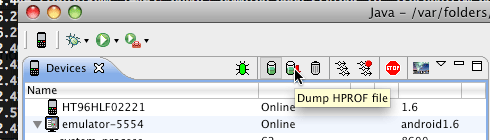
↑ のボタンを押す
メモリーリークしているっぽいものまで解析してくれる。すごい
Histogram -> ソート -> 右クリック -> List objects でどんなオブジェクトがみれるっぽい。List objects の outgoing incoming はよくわからない。
開発中これを使ったら、画像のURLを保持する的な部分で随分メモリを食っていることが分ったので、はてな記法のみを保持してURLとかは必要なときだけ更めて生成 (パフォーマンスは劣化しますがOOMでるよりはマシです) するようにしたらだいぶ改善しました。
あと、スレッドの一覧を見ながら動かして想定通りのスレッド数かを観察するのも大事だと思いました。HttpClient はインスタンスごとにプールスレッドを持つので注意が必要でした (若干反則な気がしますが static に確保するようにしました)
