2010年 08月 17日

git-branch-recent の高速化

.git/refs 以下の mtime を見ることで高速化をした。clone 直後はもしかするとズレたりするかもしれないので heavy バージョンも -s をつけることで実行できるようにした。

#!/usr/bin/env ruby -Ku

require 'pathname'
require "optparse"

class GitRecentCommand
	Ref = Struct.new(:hash, :name, :time, :rtime, :author, :subject)

	def dot_git
		@dot_git ||= Pathname.new(`git rev-parse --git-dir`.chomp)
	end

	def self.run(argv)
		self.new.option(argv).run
	end

	def initialize(opts={})
		@opts = {
			:strict  => false,
			:max_num => 20,
		}.update(opts)
	end

	def option(argv)
		opts = @opts
		argv = argv.dup
		OptionParser.new do |parser|
			parser.instance_eval do
				self.banner = <<-EOB.gsub(/^\t+/, "")
					Usage: #{$0} [opts]

				EOB

				separator ""

				separator "Options:"
				on("-s", "--strict", "Running on strict mode (very heavy)") do |foreground|
					opts[:strict] = true
				end

				on("-n", "--number NUMBER", "Number branch to show") do |num|
					opts[:max_num] = num.to_i
				end

				parse!(argv)
			end
		end
		self
	end

	def run
		details = @opts[:strict] ? recent_branches_strict : recent_branches_fast
		details = details.sort_by {|ref| ref.time }.last(@opts[:max_num])

		remote_master = nil
		rtime_width = name_width = author_width = 0
		details.each do |ref|
			name_width    = ref.name.size   if ref.name.size   > name_width
			author_width  = ref.author.size if ref.author.size > author_width
			rtime_width   = ref.rtime.size  if ref.rtime.size  > rtime_width
			remote_master = ref.hash        if ref.name == 'origin/master'
		end

		details.each {|ref|
			ref.instance_eval {
				out = "\e[32m% -#{name_width}s\e[39m % #{rtime_width}s %s \e[31m% -#{author_width}s\e[39m %s" % [
					name,
					rtime,
					hash[/^.{7}/],
					author,
					subject
				]
				puts (hash == remote_master) ? "\e[7m#{out}\e[0m" : out
			}
		}
	end

	# search recent branches by file mtimes
	def recent_branches_fast
		refs = []
		refs.concat Pathname.glob(dot_git + 'refs/heads/**/*')
		refs.concat Pathname.glob(dot_git + 'refs/remotes/**/*')

		branches = refs.reject {|r| r.directory? }.sort_by {|r| r.mtime }.last(@opts[:max_num]).map {|r|
			ref = r.read.chomp
			if name = ref[/ref: (.+)/, 1]
				(dot_git + name).read.chomp
			else
				ref
			end
		}
		retrieve_branch_details(branches)
	end

	# search recent branches by retrieving whole branch information
	def recent_branches_strict
		branches = `git branch -a`.gsub!(/^\*?\s+|\(no branch\)\s*/, "").split(/\n/).map {|i|
			i.split(/ -> /)[0]
		}
		retrieve_branch_details(branches)
	end

	# retrieve branch details information from branch names
	def retrieve_branch_details(branches)
		details = []
		IO.popen("-", "r+") do |io|
			if io.nil?
				args = [ "show", "--pretty=format:%H\t%d\t%ct\t%cr\t%an\t%s", *branches ]
				args << "--"
				exec "git", *args
			else
				while l = io.gets
					next unless l =~ /^[a-z0-9]{40}/
					hash, refs, time, rtime, author, subject = * l.chomp.split(/\t/)
					refs.gsub!(/^\s*\(|\)\s*$/, '')

					refs.split(/\s*,\s*/).each do |ref|
						is_remote = ref[%r{refs/remotes}]
						ref.gsub!(%r{refs/(remotes|heads)/}, '')
						details.push Ref.new(hash, ref, time.to_i, rtime, author, subject)
					end
				end
			end
		end
		details
	end
end

GitRecentCommand.run(ARGV)
2010年 08月 14日

zsh で C-r したときスペースを補完語として入力できないという状況を回避するバッドノウハウ

zsh で C-r しているとき、スペースを補完語に使いたくても、スペースを入力した瞬間に bck-i-search: を抜けて、コマンド先頭にスペースが挿入されてしまうという状態になっていた。望む希望としては、スペースを入力したら、スペースも補完語として挿入されてほしい。

これはどうやら、自分で bindkey " " magic-abbrev-expand-and-insert というように、スペースキーに対して独自定義の関数を定義しているとそうなってしまうらしい。

zle_hist.c によると、bck-i-search の間のキー入力はハードコードで分岐していて、既に決まっているものについて書きかえるしかない。

なんとなく magic-space を上書きしてやったら、望む挙動になった。

# abbr
typeset -A abbreviations
abbreviations=(
	"L"    "| \$PAGER"
	"G"    "| grep"

	"H"     "$HOME/project/Hatena-"

	"HE"    "lib/**/Engine/"
	"HM"    "lib/**/MoCo/"
	"HA"    "lib/**/App/"
	"HC"    "lib/**/Config.pm"

	"HEAD^"     "HEAD\\^"
	"HEAD^^"    "HEAD\\^\\^"
	"HEAD^^^"   "HEAD\\^\\^\\^"
	"HEAD^^^^"  "HEAD\\^\\^\\^\\^\\^"
	"HEAD^^^^^" "HEAD\\^\\^\\^\\^\\^"

	# typo
	"lkm"  "lm"
	"it"  "git"
	"gitp"  "git"

	"mysql" "mysql -unobody -pnobody -h"
)

magic-abbrev-expand () {
	local MATCH
	LBUFFER=${LBUFFER%%(#m)[-_a-zA-Z0-9^]#}
	LBUFFER+=${abbreviations[$MATCH]:-$MATCH}
}

# BK 
magic-space () {
	magic-abbrev-expand
	zle self-insert
}

magic-abbrev-expand-and-insert () {
	magic-abbrev-expand
	zle self-insert
}

magic-abbrev-expand-and-insert-complete () {
	magic-abbrev-expand
	zle self-insert
	zle expand-or-complete
}

magic-abbrev-expand-and-accept () {
	magic-abbrev-expand
	zle accept-line
}

magic-abbrev-expand-and-normal-complete () {
	magic-abbrev-expand
	zle expand-or-complete
}

no-magic-abbrev-expand () {
	LBUFFER+=' '
}

zle -N magic-abbrev-expand
zle -N magic-abbrev-expand-and-magic-space
zle -N magic-abbrev-expand-and-insert
zle -N magic-abbrev-expand-and-insert-complete
zle -N magic-abbrev-expand-and-normal-complete
zle -N magic-abbrev-expand-and-accept
zle -N no-magic-abbrev-expand
zle -N magic-space # BK
bindkey "\r"  magic-abbrev-expand-and-accept # M-x RET できなくなる
bindkey "^J"  accept-line # no magic
bindkey " "   magic-space # BK
bindkey "."   magic-abbrev-expand-and-insert
bindkey "^I"  magic-abbrev-expand-and-normal-complete
2010年 08月 12日

gerry++

2010年 08月 04日

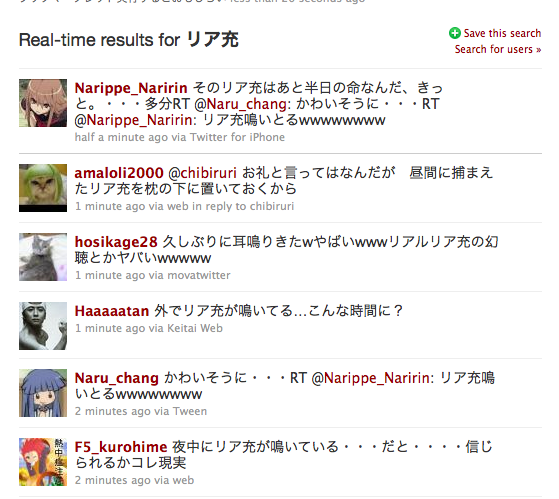
昨年の夏から、リア充の文学的表現としてセミという言葉を使っているのだけれど、脳内置換をかけるのが少しずつ億劫になってきたのでブックマークレットを書いた

昔書いたスクリプトの置換部分を変えただけ

Twitterのリアルタイム検索とかで試すとおもしろい

文学的表現としてというのはもちろん嘘ですし、単に「リア充うざい」と言うと変に誤解してしまう人がいるためにこうせざるを得なくなったのが真実ですが今となってはどうでもいいです。

2010年 07月 30日

アクセスレスポンスグラフのリアルタイムプロット

アクセスログのレスポンスグラフというのを指標にしてパフォーマンスチューニングしたりするのですが、いかんせんアクセスログの量が多く、集計に1日かかってしまうので、パフォーマンスチューニングを反映してから、ちゃんと完全なグラフがみえるまで2日はかかってしまっています。

で、直近の集計が見れたら、反映直後に早くなってるかなってないかぐらいは見えて便利そうなのでそういうのを Perl と OpenGL で書いてみました。

横軸が時間 (1秒ごとに縦線)、縦軸がその時間内にレスポンスを返せた割合 (0.1ごとに横線) です。上記のスクショだと1秒以内に91.7%のリクエストを返せていることになります。

ssh ugoproxy01.host.h 'tail -f /var/log/httpd/ugomemo.access_log' | realtimeresponsegraph.pl -p '^/$'

みたいにすると tail で流れてきたログを解析してグラフにします。(ログの形式は固定)

-p というオプションで path の正規表現を指定でき、マッチしたものだけを集計できます。便利

2010年 07月 20日

capistrano で複数のサーバデプロイ時に Mac OS だと SSH コネクションで止まる

http://subtech.g.hatena.ne.jp/secondlife/20090710/1247208362 というエントリがあって、この対処をしていたのですが、この度さらに多くのバックエンドを対象にコネクションをはろうとしたところ、全くうんともすんともいかなくなったので以下の対処をしました。

capistrano/configuration/connection.rb を書きかえるのですが

        threads = Array(servers).map { |server| establish_connection_to(server, failed_servers) }
        threads.each { |t| t.join }

となっている部分を

        i = 0
        threads = Array(servers).map { |server|
            p [i+=1, servers.length, server]
            establish_connection_to(server, failed_servers).join
        }
        #threads.each { |t| t.join }

のようにし、シーケンシャルにコネクションをはるようにしました。ついでにプログレスと対象サーバを出すことで安心感を演出しました。

もちろんそもそもこのコードはコネクションにかかる時間を節約するためにThreadにしているわけですから速度は落ちます。

自分の環境では1コネクションあたり0.5秒ぐらいかかってしまうので、40サーバぐらいあると、コネクションだけで20秒ぐらいかかってしまいます。そろそろ別のデプロイ方法を考えはじめてもよさそうですがまだ我慢できる程度なのでなんともいえないです。

2010年 07月 15日

gerry++

2010年 07月 13日

もっとも簡単な CGI を書くまでのチュートリアル

Mac だと Apache のセットアップの必要がないので Mac 前提で、特に意味はないのですが最短で CGI のスクリプトを実行するためのステップを考えてみます。

Apache 立ちあげる

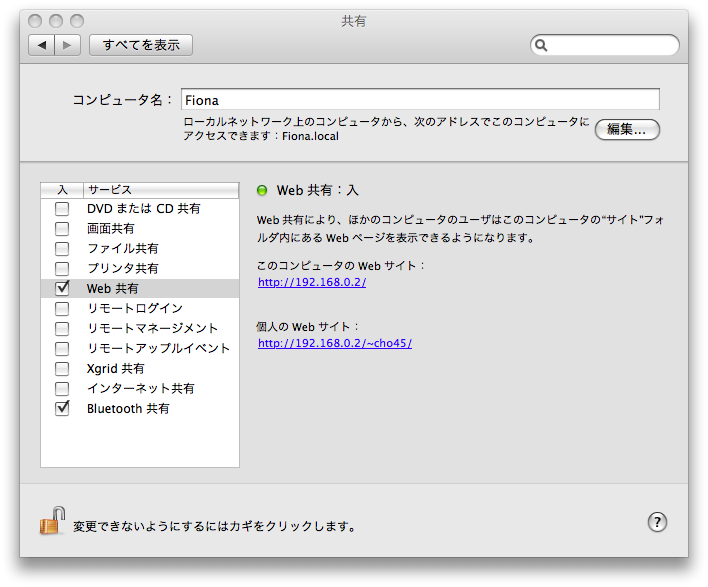
システム環境設定→共有から「Web 共有」をオンにする。

てきとうなスクリプトを設置

/Library/WebServer/Documents が / で公開されるようになっている。

CGI が実行できるようになったので以下のようなスクリプトを書いて /Library/WebServer/CGI-Executables へ hello.cgi という名前で保存する。

#!/usr/bin/env ruby -Ku

puts "Content-Type: text/html\r\n"
puts

# ---

puts <<EOF
<!DOCTYPE html>
<html>
<head>
	<title>こんにちは</title>
</head>
<body>
	<h1>こんにちは世界</h1>
</body>
</html>
EOF

さらに Terminal.app を起動し以下のコマンドをうちこむ

cd /Library/WebServer/CGI-Executables
chmod +x hello.cgi

http://localhost/cgi-bin/hello.cgi にアクセスすれば見える。

2010年 07月 06日

gerry++

3週間ぶり?ぐらい? 血便でてから病院いって薬もらってたのだけれど、遅刻しそうで薬飲まずに出社したら下痢った

Sunaba が楽しいので、スカウター的なのを書いてみた

なんとなくノリで何の意味もないのをつくって Perl で公開したいときサクっとできるので楽しいですね。id:mechairoi さんと話しながら、よくあるスカウターっぽいのをかいてみました。30分ぐらい

Plack::Request がかんたんには使えないぽいので自力でがんばってます。

use strict;
use warnings;
use URI::Escape;

use Digest::SHA1 qw(sha1_hex);
use URI;

my $handler = sub {
	my $env = shift;
	my $params = +{ map { map { uri_unescape $_ } split /=/, $_, 2 } split /[;&]/, $env->{QUERY_STRING} };


	my $content = '';
	my $url = $params->{url};
	if ($url) {
		my $uri  = URI->new($url);
		my $int  = substr(unpack('H*', sha1_hex($url)), 0, 4);
		my $link = sprintf('http://%s/?url=%s', $env->{HTTP_HOST}, uri_escape($url));
		my $status = uri_escape(sprintf('%s(ryの戦闘能力は%sです %s', $uri->host, $int, $link));
		$content = qq{
			<p>$url の戦闘能力は $int です</p>
			<a href="http://twitter.com/?status=$status">Twitter に投稿</a>
		};
	}

	[ 200, [ "Content-Type", "text/html" ], [
	qq{
		<!DOCTYPE html>
		<title>スカウター</title>
		<style type="text/css">
		body {
			line-height: 1.66;
		}

		div.content {
			width: 50em;
			padding: 1em;
			margin: 1em auto;
		}

		form {
			margin: 2em 0;
		}
		</style>

		<div class="content">
			$content
			<form action="" method="get">
			<input type="text" name="url" value="http://example.com" size="50"/>
			<input type="submit" value="測定"/>
			</form>
		</div>
	}
	] ];
}