iGPU を活用して VRAM の節約
RTX 4070 (12GB VRAM) を使ってるけど、Stable Diffusion やら Photoshop や DaVinci Resolve などを使うと非常にカツカツでアプリケーションを終了させたりしてしのいでいる。あとほんの少しVRAMがあれば……と思うことも多々ある。これらのアプリが共有メモリに侵食してくると劇的にパフォーマンスが落ちるので……
ふと iGPU を有効にして微妙に VRAM を使用する Chrome ベースのアプリや Chrome 自体を iGPU に持ってくれば、dGPU から多少の VRAM を節約できるのではないかと考えた。のでやってみることにした。なおメインメモリは余っているものとする。
iGPUを有効にする
これまで何も考えずに iGPU は無効にしていたので、まずは UEFI メニューから iGPU を有効にして再起動。メインディスプレイ以外は iGPU 側に接続しなおした。
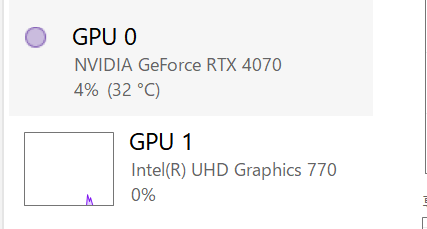
そのうえで、アプリケーションごとの設定も、特にパフォーマンスが必要ないものは iGPU を使うように。これは設定 > システム > ディスプレイ > グラフィックスからアプリケーションごとに設定できる。

細かく VRAM 使っているプロセスを指定していく。というかデフォルトを iGPU にできればいい気がするが……
Intel ドライバのアップデート
Chrome がどうもちょくちょくブラックアウトするので、Intel のディスプレイドライバを最新に


Windows における iGPU と dGPU
dwm.exe (デスクトップウィンドウマネージャ) がウィンドウの合成を担当しており、これが各ウィンドウの内容をテクスチャとして合成してディスプレイへ出力している。
あるアプリケーションが iGPU を使ってレンダリングした結果を、dGPU に接続されているディスプレイで表示する場合、dwm が合成する際に PCIe 経由でのデータ転送が発生する(転送のオーバーヘッドがかかる)。
今回のように dGPU の VRAM 負荷を軽減するために iGPU(システムメモリ)にオフロードする場合は、PCIe 転送のオーバーヘッドとのトレードオフがあることに注意が必要。
dGPU の VRAM 負荷を軽減する戦略:
- アプリ単位でのオフロード
- GPU 指定機能を使い、軽量なアプリを iGPU に割り当てる
- dGPU 接続のディスプレイに表示する場合は PCIe 転送のオーバーヘッドが発生
- マルチディスプレイ構成の活用
- メインディスプレイを dGPU に接続
- サブディスプレイを iGPU に接続
- サブディスプレイ上のアプリを iGPU 指定すれば、転送オーバーヘッドなしでオフロード可能
転送オーバーヘッドは画面領域×更新頻度に比例するため:
- 大きな画面領域を高頻度で更新するアプリ(フルスクリーンゲーム、動画編集のプレビューなど)は転送コストが大きく、オフロードに不向き
- 小さい画面や更新頻度が低いアプリ(テキストエディタ、ブラウザの静的ページなど)は転送コストが小さく、オフロードしやすい
具体例:
- dGPU 優先: 重い3Dゲーム、3DCGレンダリング、大量のテクスチャを使うアプリ、AIモデル推論など
- iGPU 可: Web ブラウザ、動画再生、コーディング環境、軽量な2Dアプリなど
関連エントリー
- Windows11 msedgewebview2.exe/Widgets.exe をアンインストール Widgets.exe 関係で msedgewebview2.exe がやたら VRAM (GPUメモリ) を消費している。全く使わない機能...
- 紅葉の写真が綺麗に見えないのはディスプレイ解像度のせいです 桜もそうだけどディスプレイ解像度が足りないとほんとに綺麗にみえない。
- ゲームのFPSを制限して消費電力を下げる プレイはしないけど起動していなければならないというゲームがちょいちょいある。こういうときに全力でGPUを使われても電気代の無駄なので、FPS...
- おうちサイネージ (食卓カレンダー) 家族の予定は基本的に共有カレンダーで管理しているが「みんなが見れる用」として食卓近くに卓上アナログカレンダーが置いてあり、何年もの間、二重管...
- Windows PowerToys の Keyboard Manager を使って macOS からの移行を支援する どうしても一部のキーバインドをなんとかしたい。こういうのは本当によく使う一部だけでもリマップするととても快適になる。Win+ナントカはほぼノ...